SalonOS for salons
Salon booking and management software
SalonOS is salon booking and management software for Indian salons and barbershops, from a two-chair studio to a chain of branches. Customers book a stylist online against real availability, the front desk runs walk-ins and GST bills from the same calendar, and the owner sees every branch in one place. It replaces the appointment register, the bill book and the rota pinned behind the counter.
What changes at your salon
Walk-ins and phone bookings land on the same chair.
Online bookings, desk bookings and the walk-in queue all check one calendar, so a stylist cannot be booked twice for the same slot. Each walk-in gets a token for the day, such as W-014, and the desk sees every stylist’s estimated wait.
A global colour takes two hours, a fringe trim ten minutes, and the register treats them alike.
Every service carries its own duration, and a variant can add time and price: colour on long hair can run longer and cost more than on short hair. A slot is offered only when the whole service fits before the stylist’s next client.
Stylists swap days off and nobody updates the book.
Stylists ask for leave from their phone, the branch manager approves it in the app, and their slots close on their own. Weekly shifts repeat per branch, so the rota is set once.
Closing the day means a calculator and a carbon copy.
Checkout turns the appointment into a numbered GST bill with CGST and SGST shown separately and your GSTIN printed. Record cash, UPI or card, split across two if the client paid that way, and send the bill as a link.
Built for salons
Your salon online, branch by branch
Your salon gets its own page and a page for every branch, with services, prices, opening hours, a map, photos and the team. Clients choose services, a stylist or anyone free, and a time.
Stylist calendars that match the floor
Availability is worked out from each stylist’s shifts, approved leave, branch holidays and existing bookings. On the reception tablet the calendar opens on today with large tap targets.
A menu with real variants
Group services under Haircuts, Hair Color, Styling, Bridal, Nail Care and Men’s Grooming. A women’s haircut can carry Long Bob and Layered Cut variants, each with its own price and time.
Walk-in queue at the counter
Add a walk-in by mobile number, pick a stylist or let SalonOS give them to whoever has the fewest active bookings, and move them from queued to in progress to done.
Combos and hair spa series
Sell a haircut, beard trim and head massage as one combo below the menu price. Or sell six hair spas as a series, paid once at the counter and booked one visit at a time.
Commission without a spreadsheet
Every billed visit counts towards the stylist who did the work, so each stylist’s monthly commission adds itself up.
Branch managers who run their own floor
A manager sees and changes the bookings, walk-ins and leave for their own branch only. The owner sees every branch from one login.
Reminders that go out on their own
Clients get a confirmation and an email reminder a day before. Stylists get a morning summary of their appointments and a push notification when a new booking lands.
Client history across branches
Search a client by name or phone and see every visit, at any branch. Managers see contact details masked, and clients see your team as Stylist and a first name.
Deposits for bridal and colour work
Take a deposit, as a percentage or a flat amount, when a client books a long service online, paid straight into your own Razorpay account with no commission to SalonOS, and set refund rules for late cancellations.
Running a barbershop?
A barbershop signs up as a salon and lists its fades, beard trims and shaves under Men’s Grooming. Most of the day runs on the walk-in queue: each customer gets a token, the counter sees each barber’s estimated wait, and a customer with no preference goes to the barber with the fewest active bookings. Regulars can still book their barber online for a fixed time.
What your team works from
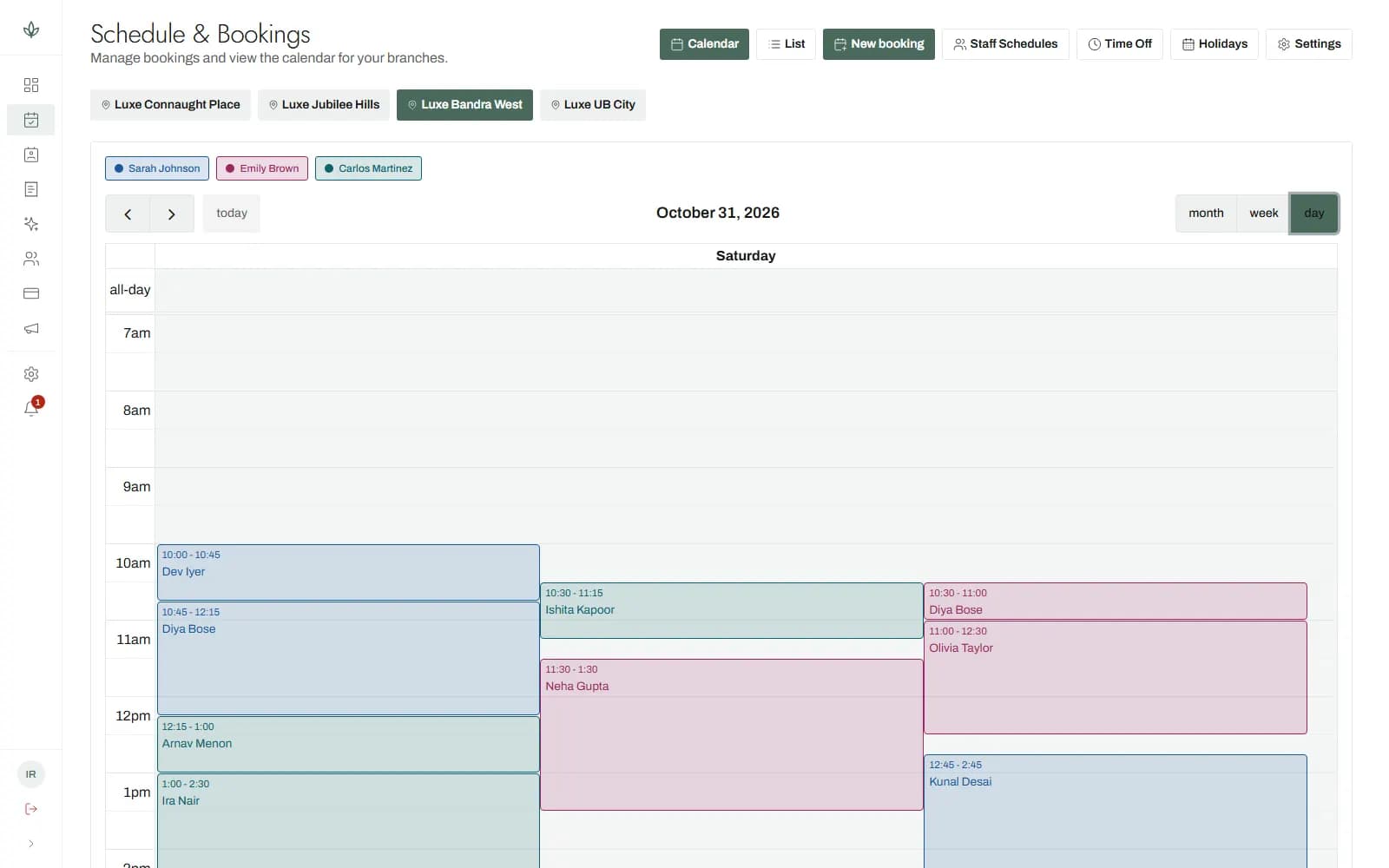
Three steps to your first booking
Create your salon
Sign up with your salon’s name, confirm your email with a six-digit code and choose Salon as your kind of business. Your dashboard opens straight away.
Add stylists and the menu
Add each stylist with their mobile number, tick the services they do and set their weekly shifts. Build the menu with categories, variants and durations.
Share your booking link
Put your salon’s page in your social bios and on your shop card. Bookings appear on the calendar and in the assigned stylist’s notifications.
Start free, pay when it earns
The free plan runs one branch with a real booking page and real bookings. It is not a trial that expires, and it needs no card. Paid plans add branches and staff, and are priced for your region on the pricing page.
Questions salons ask
- Is SalonOS free for a single salon?
- The free plan runs one salon branch with online booking, the walk-in queue, counter billing and reminders, and it never expires. Paid plans raise the number of branches and stylists; prices are on the pricing page.
- Can clients book a specific stylist?
- Clients can pick a stylist by name or let SalonOS choose one, and they only see services that someone at that branch is qualified to do.
- How does SalonOS handle walk-ins?
- Walk-ins join a queue at the counter with a daily token, a chosen or auto-assigned stylist and an estimated wait, checked against online bookings so no chair is double-booked.
- Does it make GST bills?
- Checkout issues a numbered bill with CGST and SGST shown separately and your GSTIN on it. A salon that is not GST-registered gets a Bill of Supply instead.
- Can I run more than one salon branch?
- Each branch keeps its own address, hours, holidays, stylists and booking settings, while the menu is shared across the chain and the owner sees all of it. Branch limits depend on your plan.
- Will clients see my stylists’ full names and numbers?
- Clients see the title Stylist and a first name only. Surnames and phone numbers stay private, and managers see client contact details masked.
- Does it work for a barbershop?
- A barbershop signs up as a salon, lists cuts and shaves under Men’s Grooming, and can run mostly on the walk-in queue with online booking for regulars.
- Do clients get appointment reminders?
- Clients get a booking confirmation and an email reminder 24 hours before their appointment, sent without anyone at the desk lifting a finger.
- Can I sell hair spa packages?
- Bundle services as a combo at one price, or sell a series such as six hair spas, paid once at your counter and booked one session at a time.
- Can I take a deposit for bridal bookings?
- On paid plans you can ask for a deposit, as a percentage or a flat amount, and set refund rules by how much notice the client gives before cancelling. The money goes into your own Razorpay account and Razorpay settles it to your bank; SalonOS takes no commission.
Also built for
Every kind of business we servePut your salon online today
Create your business in a few minutes, or sign in if your team already has an account.